Documentation pages
Using symcc
For contributors
On this page
Releasing #
For people who release symcc. symcc has two things to release, on two tracks:
| What | Where it lives | How people get it | How you release it |
|---|---|---|---|
| The plugin | the whole repository | Claude Code, Copilot CLI or OpenCode installs it | bump its version, merge to main |
The extension (kourgeorge.symcc) | hosts/vscode/extension/ | the VS Code Marketplace or Open VSX | bump its version, push a vscode-v<version> tag |
The plugin is the product. The extension is only a client: it finds the plugin a harness installed, runs that copy's
editor/serve.mjs, and shows that copy's editor/webview/. So most changes need only a plugin release, and the
extension is released rarely. See The editor extension.
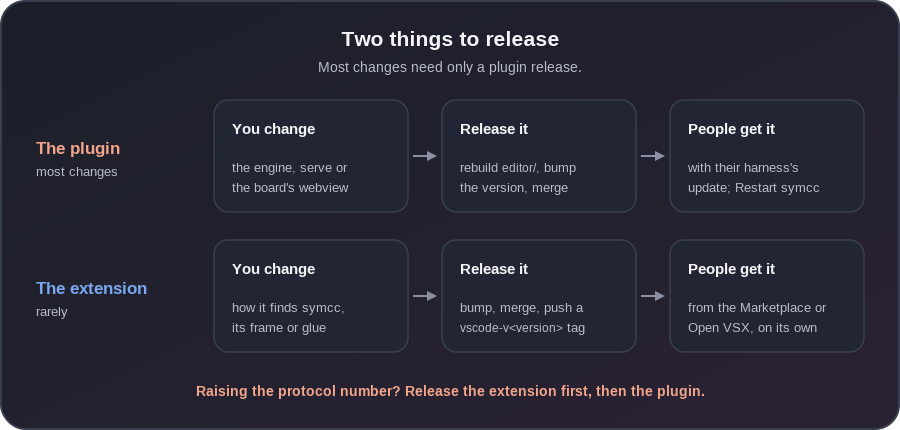
I changed X, so I release Y #
| I changed | Release |
|---|---|
The engine (hooks/core/, hooks/app/, hooks/process/, prompts/, kinds/, roles/) | The plugin. Run sh scripts/build-editor.sh and sh scripts/build-copilot.sh first, since both bundle the engine. |
Claude Code's or OpenCode's parts (hooks/claude/, hooks/register.tsx, hooks/opencode/, opencode/) | The plugin. |
The Copilot CLI host (hooks/copilot/) | The plugin, after sh scripts/build-copilot.sh. Also sh scripts/build-editor.sh: serve uses its edit guard. |
serve or the board in the editor (hosts/vscode/*.ts) | The plugin, after sh scripts/build-editor.sh. Not the extension. |
The board's webview (hosts/vscode/extension/webview/) | The plugin, after sh scripts/build-editor.sh. It is built into editor/webview/, not into the extension. |
The extension's own code (hosts/vscode/extension/src/, its package.json, media/, README.md) | The extension. |
The contract (hosts/vscode/contract.ts) | See The protocol number. |
sh scripts/build-editor.sh --check and sh scripts/build-copilot.sh --check say whether the committed builds are up
to date. sh scripts/typecheck.sh prints the first as a note.
Releasing the plugin #
- Run
sh scripts/build-editor.sh --checkandsh scripts/build-copilot.sh --check. If one says "out of date", run it without--checkand commit what it wrote. - Bump the version in
.claude-plugin/plugin.jsonand.claude-plugin/marketplace.json, and add an entry toCHANGELOG.md. - Merge to
main. People update with their harness:- Claude Code:
claude plugin marketplace update symcc && claude plugin update symcc@symcc - Copilot CLI:
copilot plugin marketplace update symcc, thencopilot plugin update symcc@symcc - OpenCode:
opencode plugin update, orgit pullin the clone they linked
- Claude Code:
- In the editor, symcc: Restart symcc picks up the new copy.
Releasing the extension #
Bump
versioninhosts/vscode/extension/package.json, runnpm install --package-lock-onlythere, and add a## <version>section tohosts/vscode/extension/CHANGELOG.md.Try it:
npm run packageinhosts/vscode/extensionwritessymcc-<version>.vsix. Install it withcode --install-extension symcc-<version>.vsix(orcursor --install-extension).Merge to
main.Tag that commit on
kourgeorge/symccand push the tag:git tag vscode-v0.1.1 git push origin vscode-v0.1.1.github/workflows/release-extension.ymlruns. It checks that the tag matches the version and that the CHANGELOG has its section, type-checks, runs the lookup tests, packages one VSIX for all platforms, keeps it as the run's artifact, then publishes it to the VS Code Marketplace and to Open VSX. vsce and ovsx are pinned in the workflow.Check both pages a few minutes later: VS Code Marketplace and Open VSX. Installed copies update on their own.
When one store fails (an expired token, say), fix it and use Re-run failed jobs. The version already published is skipped, and the other store gets it.
One-time setup #
George owns the publisher and the secrets. Once:
- VS Code Marketplace.
- Make sure the publisher
kourgeorgeexists at marketplace.visualstudio.com/manage (create it there if not). - In Azure DevOps (dev.azure.com), make a personal access token: User settings, Personal access tokens, New token. Organization: All accessible organizations. Scopes: Custom defined, then Marketplace: Manage.
- Check it:
npx @vscode/vsce@4.1.1 verify-pat kourgeorge.
- Make sure the publisher
- Open VSX.
- Sign in at open-vsx.org with GitHub. In your profile, log in with an Eclipse account and sign the Open VSX Publisher Agreement.
- Make an access token (Settings, Access Tokens).
- Create the namespace:
npx ovsx@1.4.0 create-namespace kourgeorge -p <token>.
- GitHub. In
kourgeorge/symcc, Settings, Secrets and variables, Actions, add two repository secrets:VSCE_PAT(the Azure DevOps token) andOVSX_PAT(the Open VSX token).
Azure DevOps tokens expire (a year at most). Renew VSCE_PAT before then, or the next release fails at its publish
step.
The protocol number #
The extension and serve talk through a small contract, hosts/vscode/contract.ts, which has a number, PROTOCOL.
serve says its number in its ready line and in editor/serve.json. The extension speaks a range (SPEAKS in
hosts/vscode/extension/src/extension.ts: low up to the PROTOCOL it was built with), and it only runs a copy
whose number is in that range. The rule for when to raise the number is in
The contract and its number.
When you raise it from N to N+1:
- Make the extension handle N+1, and keep handling N where it can. Keep
lowat the oldest number it still handles. - Release the extension first. It speaks up to N+1, so it still runs the plugin people have now.
- Then release the plugin. Anyone whose extension hasn't updated yet sees "newer than this extension: update the symcc extension" until it does.
Never release a plugin whose number no published extension speaks.
The editors it supports #
engines.vscode in the extension's package.json is ^1.101.0. symcc needs Node 22.13 or newer, and VS Code 1.101
was the first on Node 22 (Electron 35, Node 22.15.1). That fact is from VS Code's release notes as remembered, not
checked from the build machine. What was checked (November 2026): Cursor 3.26 to 3.31 report VS Code 1.128.0, Cursor
3.32.4 reports VS Code 1.147.0, and all of them run Node 24.22.1. Windsurf wasn't checked. When an editor reports a
lower VS Code version, it can't install the extension, so check Windsurf before raising this further.